Insight-led UX at GoDaddy
 What I did
In this project, I used behavioral data to drive adoption, improve team alignment, and involve insights into meaningful user-research-driven improvements.
- Led the adoption of FullStory on my team to understand where users struggled, hesitated, or dropped off when using GoDaddy products
- Identified usability issues and areas of friction by observing real user behavior
- Learned how to use Fullstory reporting tools and facilitated bi-weekly "Watch Parties" to share my knowledge and help my team learn more about user behavior
- Interpreted findings and documented outcomes to ensure our discoveries led to real UI fixes and UX improvements
- Used "watch parties" to help engineers and designers feel more connected to the customers they were building for, making pain points tangible and motivating stronger commitment to the work
Why it mattered
This work helped give GoDaddy users a voice in product decisions. ✨
By observing user behavior together, I helped my team move beyond assumptions and metrics to understand where our GoDaddy users struggled or hesitated. The outcomes of this project improved the usability, polished the visual design and addressed real user needs across multiple GoDaddy products.
Tools I used
FullStory
Figma
Confluence/JIRA
Role
Sr. UX Designer, GoDaddy
WHAT IS FULLSTORY?
Fullstory is a digital experience intelligence platform that captures and replays user sessions, allowing teams to see exactly what their users are doing and where they might be encountering issues or struggling to complete tasks.
Using FullStory to Observe User Behavior
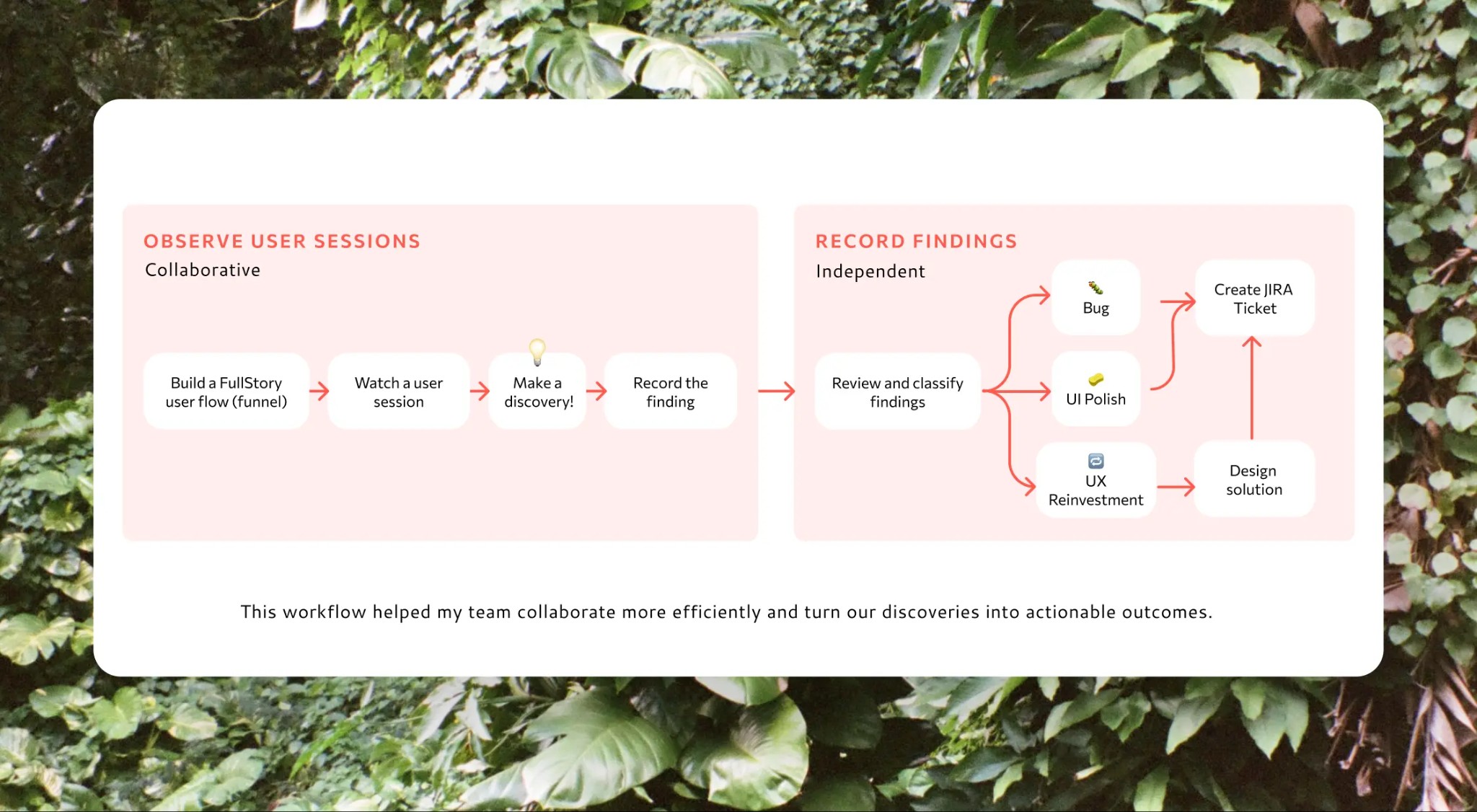
Every other week, I led a "Watch Party 🎉" meeting where my team and I observed recorded user sessions via Fullstory. Together, we watched real customers use the tools we built, which helped us identify behavior patterns, usability issues, and opportunities to refine the experience. The timeline below shows how this repeatable session structure kept discussions focused, engaging, and actionable.
Parsing through our Findings
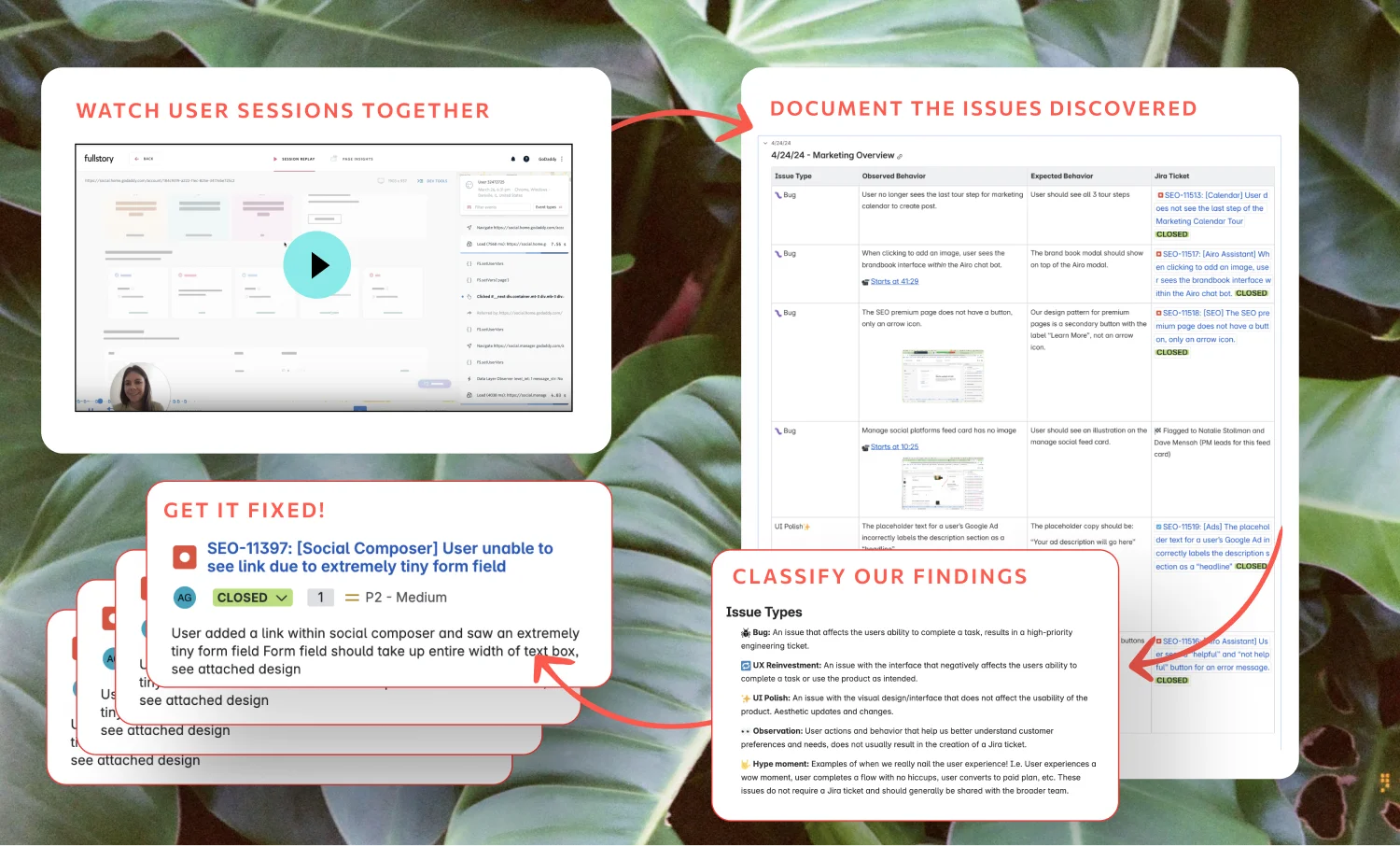
I categorized our discoveries and partnered with stakeholders, both on my own team and beyond, to share findings and coordinate fixes. This process led to consistent UI improvements across multiple products, helped streamline key user journeys, and increased the application of GoDaddy's design language.
Turning Insights into Results
Observation
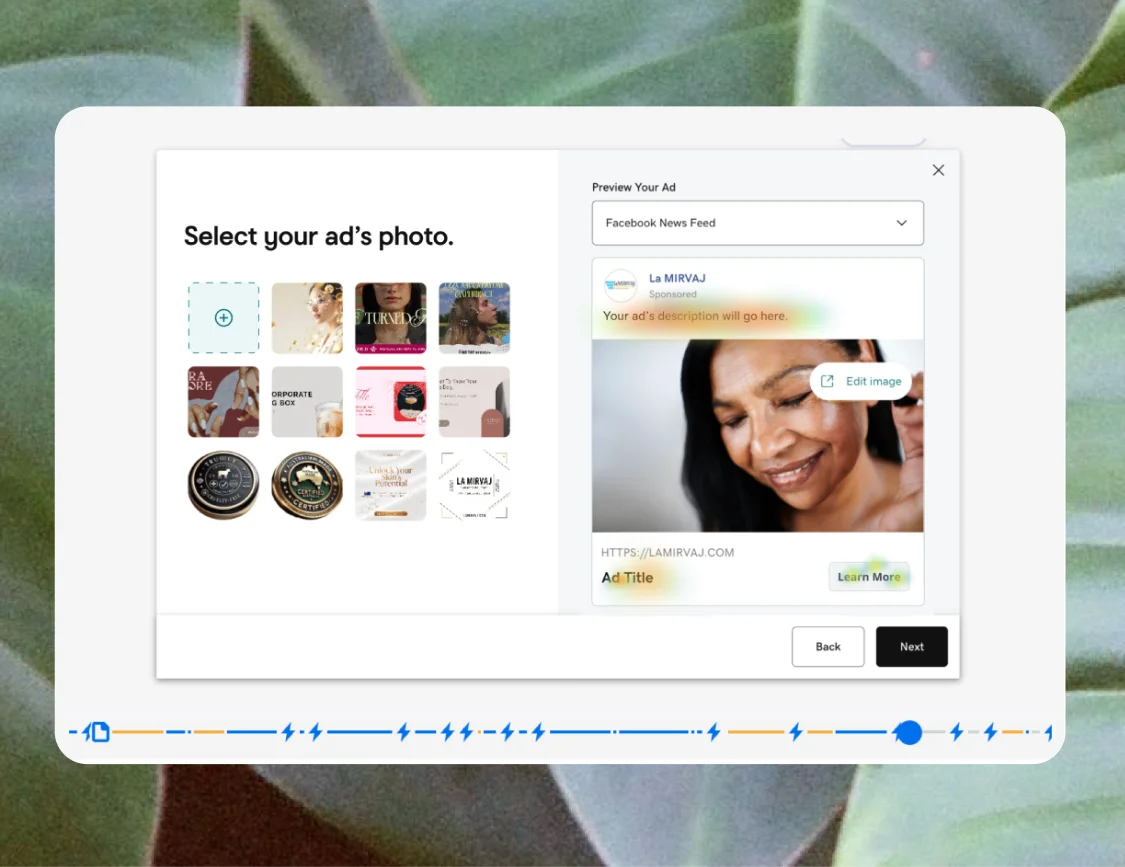
Reviewing FullStory sessions revealed that users frequently clicked the ad preview while selecting an image, attempting to edit written content earlier than the flow allowed. This behavior signaled confusion about where and when copy could be edited.
Recommendation
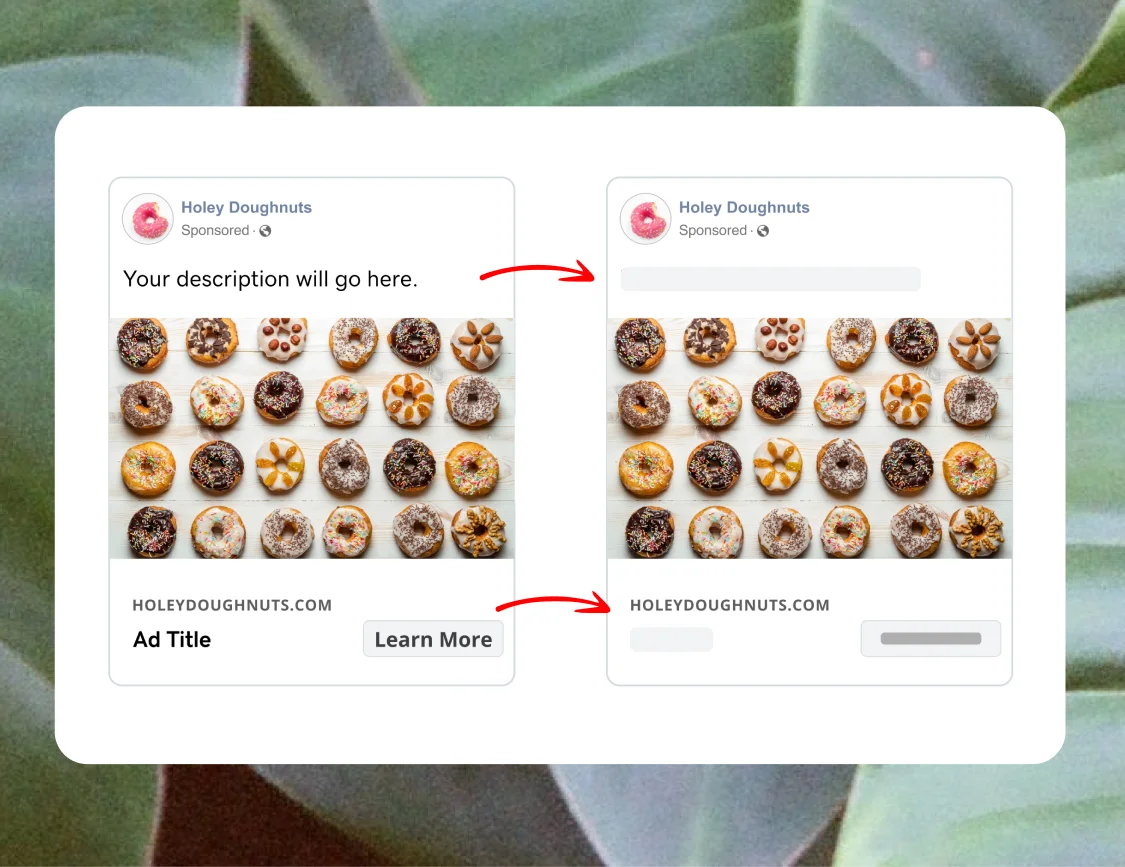
I replaced the placeholder text in the ad preview with skeleton UI, helping users stay focused on image selection and previewing how their ad would appear across platforms.
Impact
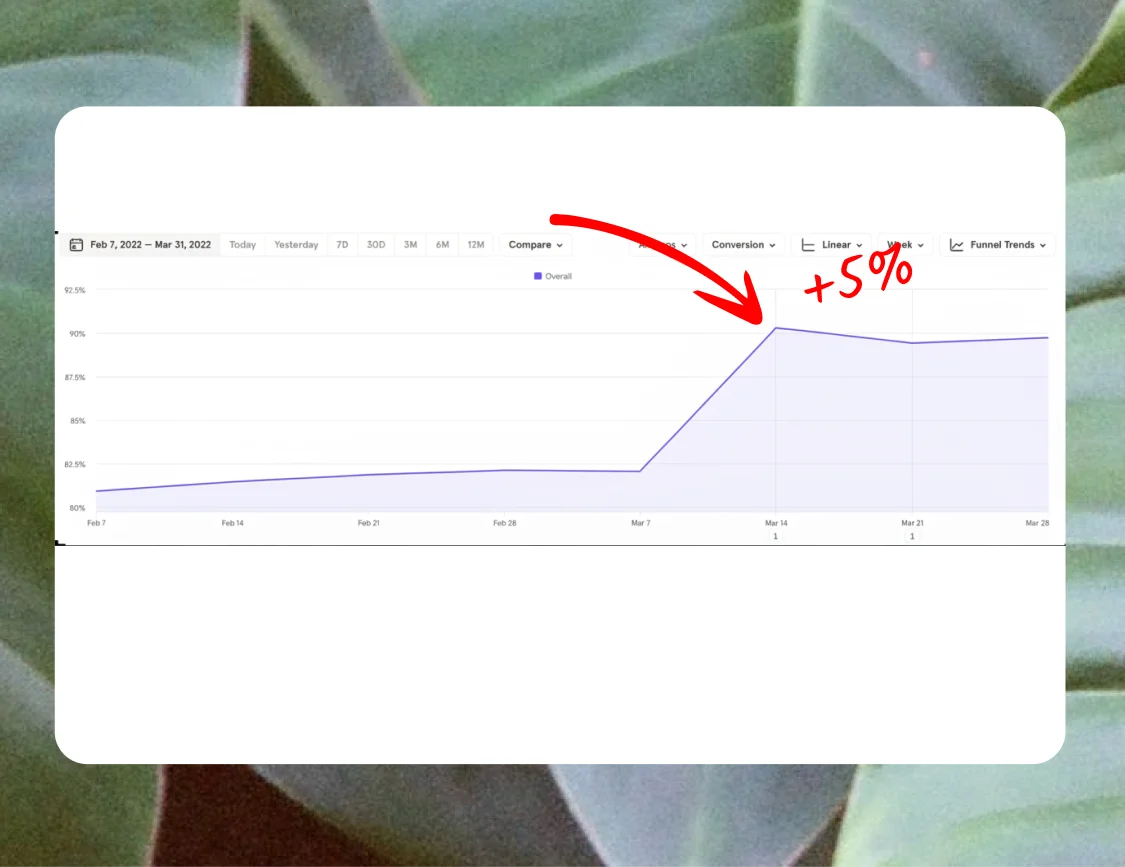
This update led to a 5% increase in completion on the image selection step and reduced user confusion by making the flow feel more predictable, focused, and easy to navigate.
Observation
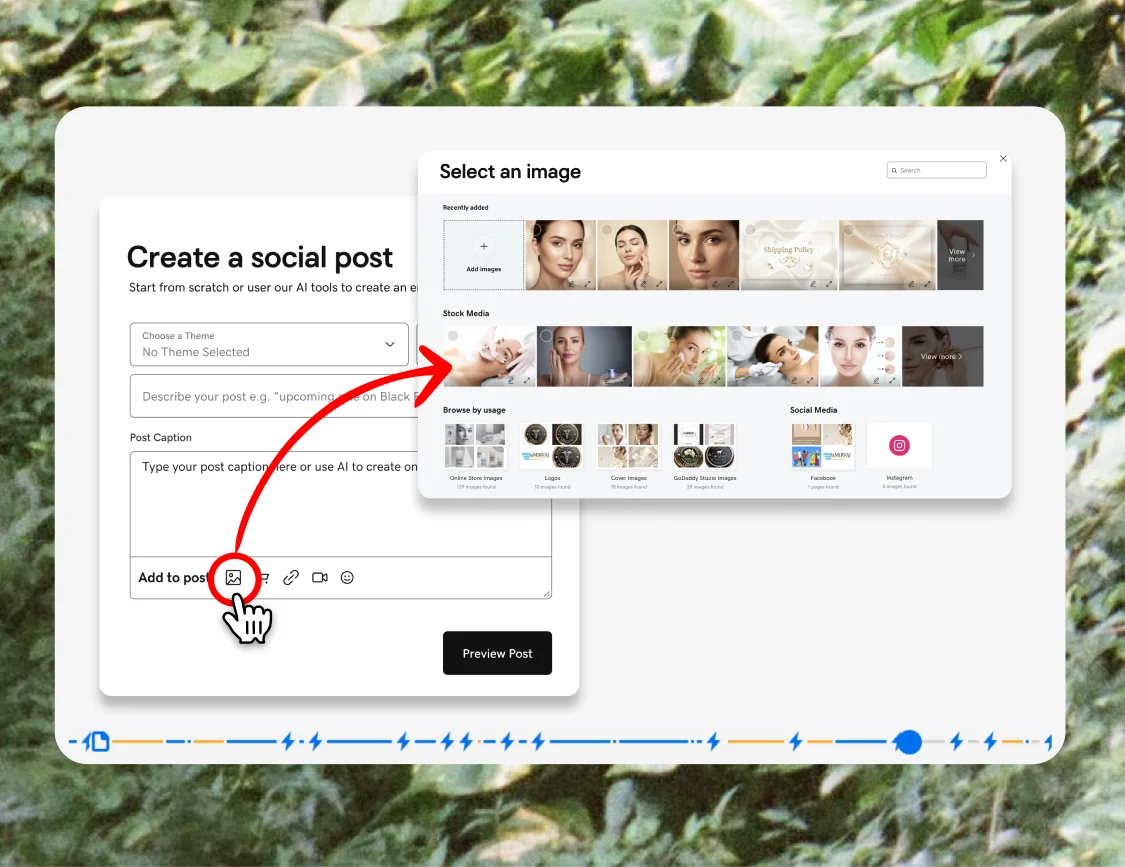
FullStory sessions revealed that users repeatedly began creating their social posts by searching for an image, spending significant time browsing both stock photos and their own uploads, before moving on to the rest of the post.
Recommendation
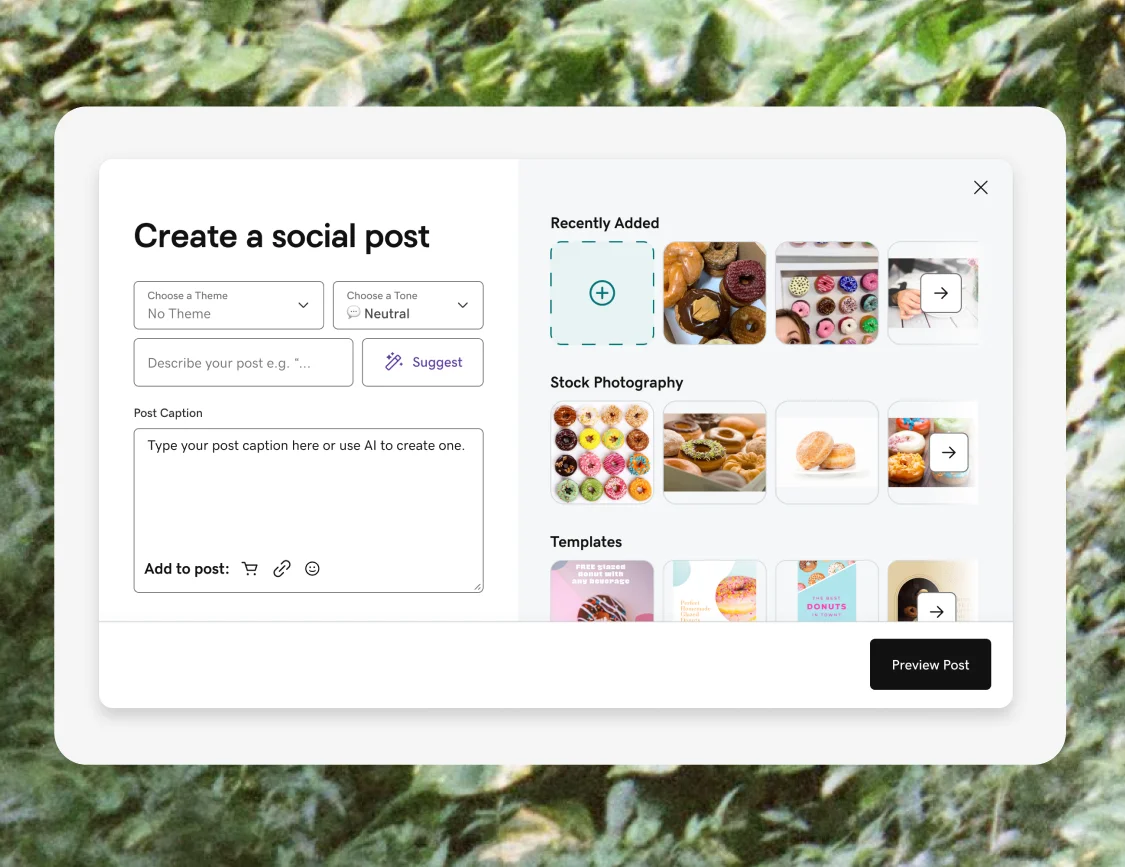
I surfaced the image selection tools directly within the composer UI and removed the extra step required to add imagery, allowing users to start where they naturally wanted to: by selecting and refining visuals. This aligned the experience to existing user behavior and created a more intuitive, immediately useful experience.
Impact
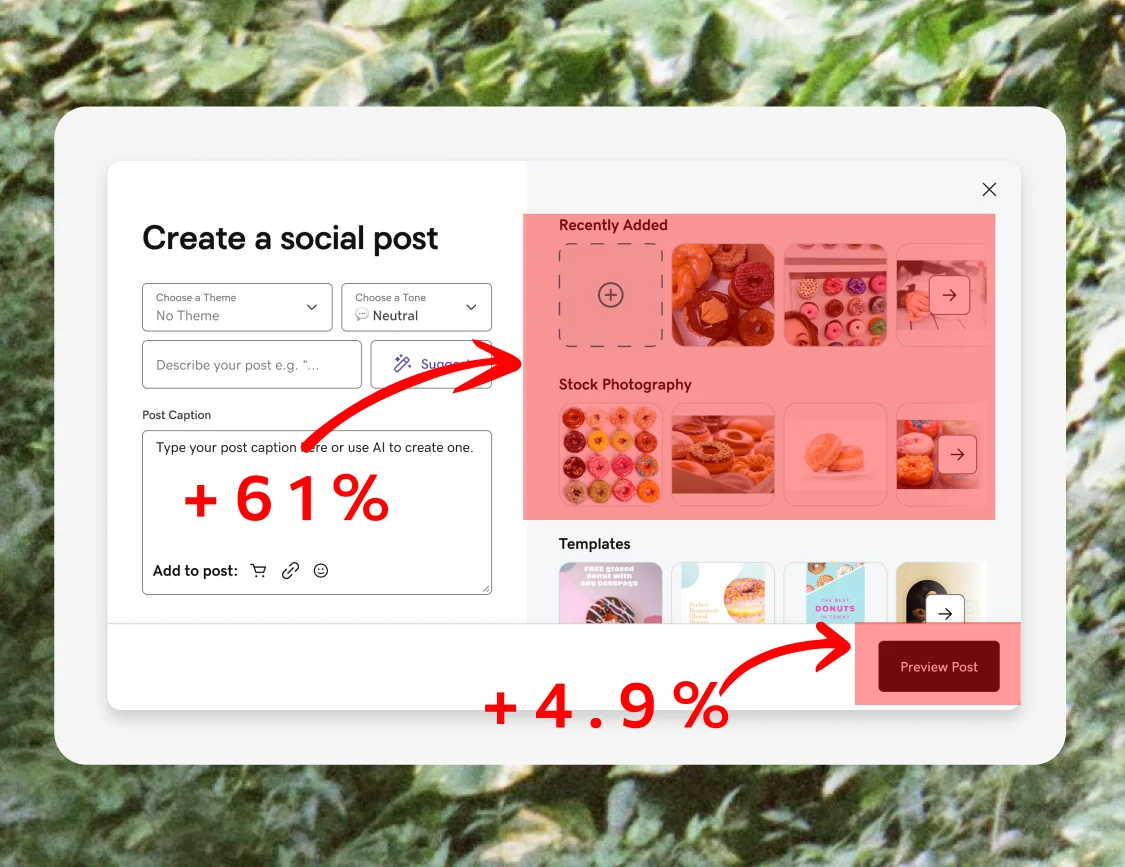
This update led to a 4.91% increase in total posts created and a 15% increase in posts that included media. Most notably, successful image selection increased by 61.9%, confirming that simplifying access to visuals helped more users complete posts and create higher-quality content.
Leaving a Lasting Impact
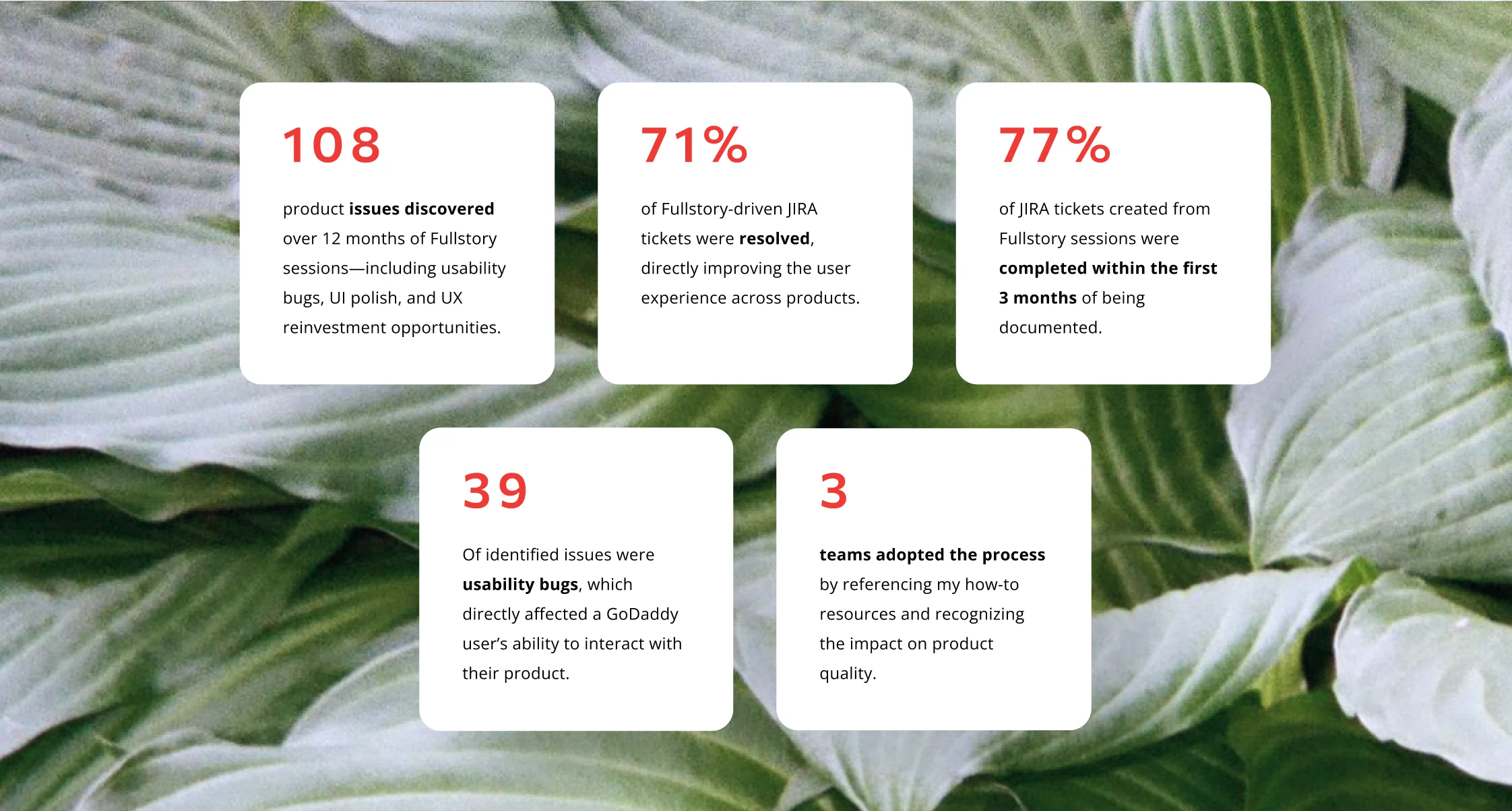
The process I led didn't just reveal UX problems, it created a clear pathway for how to address them. By facilitating a shared space to observe user behavior, document insights, and design solutions, our team improved both the usability (UX) and visual polish (UI) of our product.
WHAT I LEARNED
Watching real user sessions together transformed abstract metrics into human stories. Bringing my team closer to the customers they were building for motivated us to prioritize even the smallest UI improvements and elevate the overall polish and usefulness of the product.
Insight-led UX at GoDaddy
What I did
In this project, I used behavioral data to drive adoption, improve team alignment, and involve insights into meaningful user-research-driven improvements.
- Led the adoption of FullStory on my team to understand where users struggled, hesitated, or dropped off when using GoDaddy products
- Identified usability issues and areas of friction by observing real user behavior
- Learned how to use Fullstory reporting tools and facilitated bi-weekly "Watch Parties" to share my knowledge and help my team learn more about user behavior
- Interpreted findings and documented outcomes to ensure our discoveries led to real UI fixes and UX improvements
- Used "watch parties" to help engineers and designers feel more connected to the customers they were building for, making pain points tangible and motivating stronger commitment to the work
Why it mattered
This work helped give GoDaddy users a voice in product decisions. ✨
By observing user behavior together, I helped my team move beyond assumptions and metrics to understand where our GoDaddy users struggled or hesitated. The outcomes of this project improved the usability, polished the visual design and addressed real user needs across multiple GoDaddy products.
Tools I used
FullStory
Figma
Confluence/JIRA
Role
Sr. UX Designer, GoDaddy
WHAT IS FULLSTORY?
Fullstory is a digital experience intelligence platform that captures and replays user sessions, allowing teams to see exactly what their users are doing and where they might be encountering issues or struggling to complete tasks.
Using FullStory to Observe User Behavior
Every other week, I led a "Watch Party 🎉" meeting where my team and I observed recorded user sessions via Fullstory. Together, we watched real customers use the tools we built, which helped us identify behavior patterns, usability issues, and opportunities to refine the experience. The timeline below shows how this repeatable session structure kept discussions focused, engaging, and actionable.
Parsing through our Findings
I categorized our discoveries and partnered with stakeholders, both on my own team and beyond, to share findings and coordinate fixes. This process led to consistent UI improvements across multiple products, helped streamline key user journeys, and increased the application of GoDaddy's design language.
Turning Insights into Results
Observation
Reviewing FullStory sessions revealed that users frequently clicked the ad preview while selecting an image, attempting to edit written content earlier than the flow allowed. This behavior signaled confusion about where and when copy could be edited.
Recommendation
I replaced the placeholder text in the ad preview with skeleton UI, helping users stay focused on image selection and previewing how their ad would appear across platforms.
Impact
This update led to a 5% increase in completion on the image selection step and reduced user confusion by making the flow feel more predictable, focused, and easy to navigate.
Observation
FullStory sessions revealed that users repeatedly began creating their social posts by searching for an image, spending significant time browsing both stock photos and their own uploads, before moving on to the rest of the post.
Recommendation
I surfaced the image selection tools directly within the composer UI and removed the extra step required to add imagery, allowing users to start where they naturally wanted to: by selecting and refining visuals. This aligned the experience to existing user behavior and created a more intuitive, immediately useful experience.
Impact
This update led to a 4.91% increase in total posts created and a 15% increase in posts that included media. Most notably, successful image selection increased by 61.9%, confirming that simplifying access to visuals helped more users complete posts and create higher-quality content.
Leaving a Lasting Impact
The process I led didn't just reveal UX problems, it created a clear pathway for how to address them. By facilitating a shared space to observe user behavior, document insights, and design solutions, our team improved both the usability (UX) and visual polish (UI) of our product.